
Two parents can keep one set of baby photos with iCloud Shared Photo Library, a shared album, Google Photos partner sharing, a daily AirDrop habit, or an app that finds your child on each phone. Shared Library is the most automatic for two iPhones. Google Photos works if one parent uses Android. AirDrop and shared albums need someone to remember.
Each parent takes different photos of the same baby, and each phone keeps its own. Below are the real options, with what each costs in effort and storage and where duplicates come from. Apple and Google facts were checked on their support pages on 15 Oct 2026. For the limits of each Apple feature, see iCloud Shared Library vs Shared Album.
What are the ways two parents can share one set of baby photos?
There are five common ways, and they differ mostly in how much each parent has to remember to do.
| Option | Automatic? | Works with Android? | Whose storage | Main trade-off |
|---|---|---|---|---|
| iCloud Shared Photo Library | Can be, from the Camera | No | The organizer's iCloud | Photos move out of your own library, and either parent can delete them |
| A shared album both parents add to | No | Yes, on the web, in albums made or upgraded in iOS 27 | The album owner's iCloud, in iOS 27 | Holds only what someone remembers to add |
| Google Photos partner sharing | Yes, once photos back up | Yes | Each sender's Google Account | One partner at a time, and photos live in a second service |
| AirDrop at the end of the day | No | No | Each parent's own | Easy to skip, and creates second copies |
| An app that finds your child on each phone | Varies by app | Varies by app | Varies by app | Usually paid, and you depend on the app |
How does iCloud Shared Library pull in both phones' photos?
iCloud Shared Photo Library is a second library that up to six people share, and it can fill itself from the Camera, according to Apple's How to use iCloud Shared Photo Library (checked 15 Oct 2026). Apple's guide to adding content to a Shared Library describes the options.
- Go to Settings, tap Apps, then Photos, then Shared Library, and invite your partner, as Apple's Shared Library article (published 17 Sep 2026) describes.
- Choose past photos to move in, or move them later.
- Turn on Sharing from Camera. Share Automatically adds photos you take when other members are nearby, as long as both phones have Bluetooth on. Share When At Home adds photos you take at home.
- Turn on Shared Library Suggestions and add your baby during setup, so Photos suggests photos of them to add.
Apple says photos you contribute move out of your Personal Library, all participants can add, edit and delete content, and the person who set up the library provides the iCloud storage for all of it. You can belong to only one Shared Library at a time. Both parents need iOS 16.1 or later with iCloud Photos turned on.
For a side-by-side look at Shared Library and shared albums, including which one suits grandparents, see iCloud Shared Library vs Shared Album for baby photos.
Does a shared album work for two parents?
A shared album works if both parents are disciplined about adding photos. Nothing goes in by itself. Each of you picks photos and adds them, following Apple's guide to contributing to a shared album.
In iOS 27, a new album keeps full resolution and counts everything, including what the other parent adds, toward the owner's iCloud storage, according to Apple's Shared Albums limits page (checked 15 Oct 2026). iCloud Shared Albums in iOS 27 covers older albums and their limits.
Can Google Photos partner sharing work if one parent has Android?
Yes. Google Photos partner sharing works between an iPhone and an Android phone, because both parents use the Google Photos app. Google's help page for partner sharing on iPhone (checked 15 Oct 2026) says you can share all photos, photos of specific people, or photos since a chosen day. Your partner can choose to save them to their own account automatically.
Know the limits before you rely on it.
- Backup comes first. Google says your partner only receives photos you've backed up to Google Photos.
- One partner at a time. To share with someone new, you stop sharing with your current partner first.
- Face groups aren't perfect. Google says sharing photos of specific people may occasionally include photos without them, and isn't available in every region.
- Storage. Google's page on backup quality says each Google Account comes with up to 15 GB of storage, and backed-up photos count toward it (checked 15 Oct 2026). Photos your partner saves from you don't use their storage as long as you keep sharing them.
On an iPhone, this means the same photos sit in Apple Photos and in Google Photos.
Is AirDropping photos to each other enough?
AirDrop is enough for parents who like a nightly routine, and it needs no extra service or plan. Open the photos, tap Share, then AirDrop, and choose your partner, following Apple's AirDrop guide. Apple says both phones need Wi-Fi and Bluetooth on and need to be within 30 feet (10 meters) to start, and a photo sent from Photos is saved in Photos on the other phone (checked 15 Oct 2026).
AirDrop makes a second copy. After a year, both phones hold many of the same photos, and the photos you forgot to send are still on one phone only.
Where do duplicate baby photos come from?
Duplicates come from sending copies. A photo AirDropped, texted, or saved from a shared album becomes a separate copy in the other parent's library. If you later move both libraries into a Shared Library, those copies can end up side by side.
Two parents photographing the same moment from different angles is different. Those are two photos, not duplicates, and most families want both.
To clean up exact copies on one iPhone, open Photos, tap Collections, then Utilities, then Duplicates, and tap Merge, according to Apple's guide to merging duplicates. Apple says the Duplicates collection only appears when Photos finds duplicates. Our guide to organizing baby photos on iPhone covers the rest of the cleanup.
What does an app that finds your child on each phone add?
An app in this category looks through the camera roll for your child and lays the photos out by child, so neither parent has to choose them one by one. How each app handles a second parent, storage and privacy varies, so read the listing before you sign up. Our comparison of apps that find your baby in your camera roll goes through them.
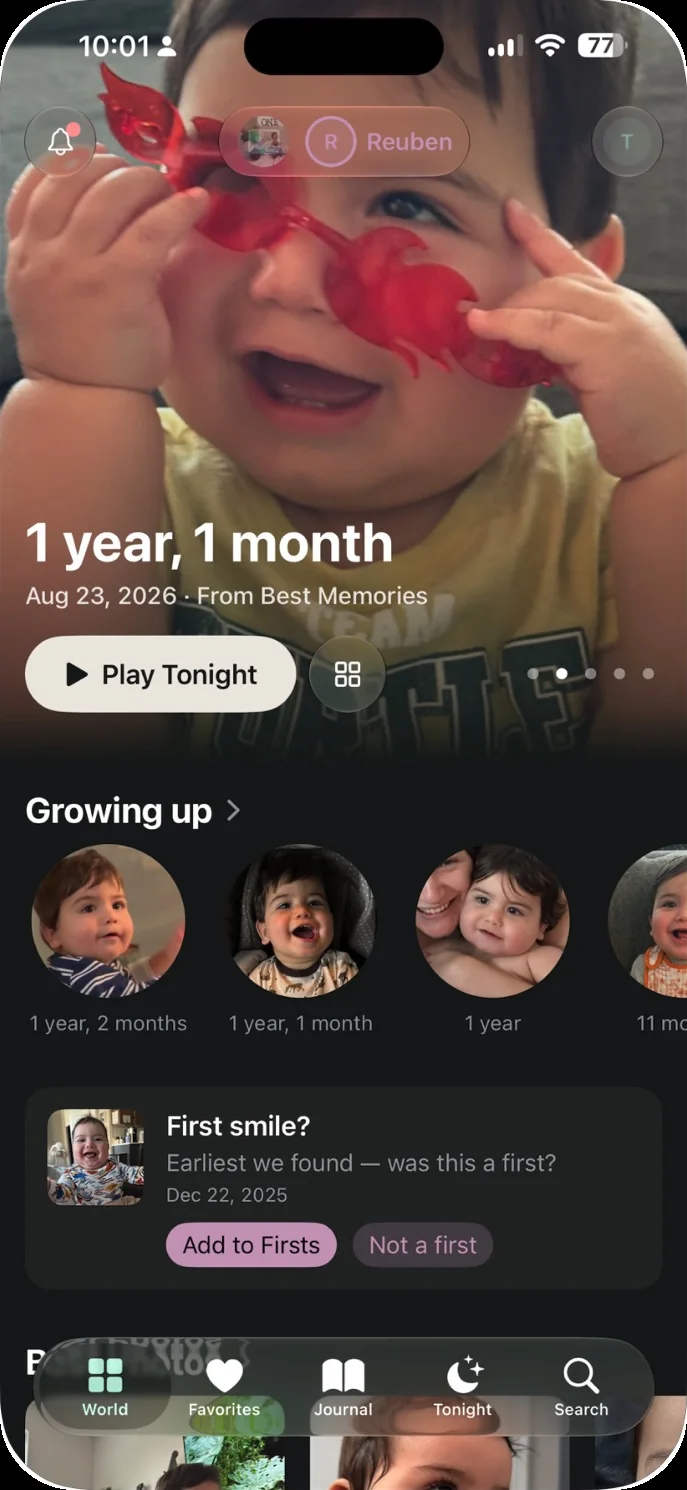
The app we make: Our Little World is a private baby book app for iPhone and iPad made for two parents. It finds your child in the photos on your iPhone and lays them out month by month. Invite the other parent, and once you each say yes, your photos of the children join theirs and theirs join yours, with no shared albums to keep up. Shared copies are resized and sent without their location or camera details. When you add words or a voice note to a photo, they go to the other parent too. You can turn this off in Settings. One plan covers both of you. Grandparents and family members you invite can view what's shared with them, never face data. You can read more on our page for both parents. Our Little World isn't for couples where one parent uses Android, for families who want a printed book, or for anyone who needs a free plan.