
iCloud Shared Photo Library suits two parents. Shared Library holds up to six people, keeps your photos as they are, and can add camera photos automatically. A Shared Album suits grandparents. An album holds up to 100 people, can be view-only, and new albums open on the web. Both use the owner's iCloud storage in iOS 27.
Apple changed Shared Albums in iOS 27, so older comparisons that call shared albums "free but low resolution" are only half right now. The table below uses Apple's support pages, checked on 15 Oct 2026. This page compares the two Apple features. For setup steps and options beyond Apple, see how two parents can keep one set of baby photos.
What is the difference between iCloud Shared Library and a Shared Album?
A Shared Library is a second photo library that up to six people own together. A Shared Album is a collection you invite people into to look at, comment on and, if you allow it, add to.
| iCloud Shared Photo Library | Shared Album (created in iOS 27 or later) | Shared Album (created in iOS 26 or earlier) | |
|---|---|---|---|
| Who can join | Up to 6 people, including the organizer (Apple) | Up to 100 participants, including the owner (Apple) | Up to 100 subscribers (Apple) |
| What they need | iOS 16.1, iPadOS 16.1 or macOS Ventura or later, with iCloud Photos on (Apple) | iOS 27 or later, or a web browser. Web participants don't need an Apple Account (Apple) | An Apple device, or any browser if the owner turns on Public Website (Apple, iOS 26 guide) |
| How many albums or libraries | One Shared Library at a time | Apple lists no album limit beyond the owner's storage | An owner can share 200 albums, and a user can subscribe to 200 |
| Photo quality | Photos move in from your library as they are (Apple) | Original format, full resolution | Reduced to 2,048 pixels on the long edge |
| Whose iCloud storage | The organizer's, for everything | The owner's, including what participants add | None |
| Automatic? | Can be. Sharing from Camera can add photos when other members are nearby or when you're at home | No. Someone adds each photo | No. Someone adds each photo |
| Who can delete | All participants can delete anything. Only the contributor can remove an item from Recently Deleted | The organizer, and anyone set to Can Manage Album and Photos, can delete anything. Other participants can delete only what they added (Apple) | Same as new albums |
| View-only members | No | Yes, with Can View and Comment (Apple) | Yes |
Unless another link is given, Shared Library facts come from Apple's How to use iCloud Shared Photo Library (published 17 Sep 2026) and its setup guide, and Shared Album facts come from Apple's Shared Albums limits (published 14 Sep 2026). All were checked on 15 Oct 2026.
Which fits two parents?
The Shared Library fits two parents better, because it's the only one of the two that can add photos without anyone choosing them, using the Camera's sharing options in Apple's guide to adding content to a Shared Library. A Shared Album works only if you both remember to add photos. Setup steps, the trade-offs and options beyond Apple are in how two parents can keep one set of baby photos.
Which fits grandparents?
A Shared Album fits grandparents better. It can hold up to 100 people, you can set each one to Can View and Comment, and a new or upgraded album opens on iCloud.com from any device, according to Apple's Upgrade your shared albums page. Apple says a grandparent can join on the web even without an Apple Account or Apple device, so one on Android can take part.
A Shared Library is a poor fit for grandparents. It holds six people, every member can delete photos, and a grandparent can only be in one.
A new Shared Album counts everything in it, including what relatives add, against the owner's iCloud storage. iCloud Shared Albums in iOS 27 covers that change and how to set up an album for grandparents.
What happens to the photos if someone leaves?
When a participant leaves a Shared Library, Apple says they can keep a copy of everything or only what they contributed. If the organizer deletes the library, members who joined more than seven days earlier receive everything, and newer members receive only what they added.
A Shared Album works the other way round. Apple's Shared Albums limits page says photos stay in iCloud until the owner or the contributor deletes them, or until the album is deleted. Apple's guide to creating shared albums says photos you saved from a shared album to your own library stay there even if the album is deleted. So save the ones you want to keep.
Does either one sort photos by child?
No. Neither sharing feature sorts photos by child or by age. A Shared Library puts both parents' photos side by side, but it's still one long timeline mixed with everything else you shoot. The Photos app's People & Pets can find a child you've named, which our organizing guide covers. A Shared Album holds only what someone chose to add. Neither keeps a list of Firsts or your baby's age on each photo. Our guide to organizing baby photos on iPhone shows what you can do in the Photos app itself.
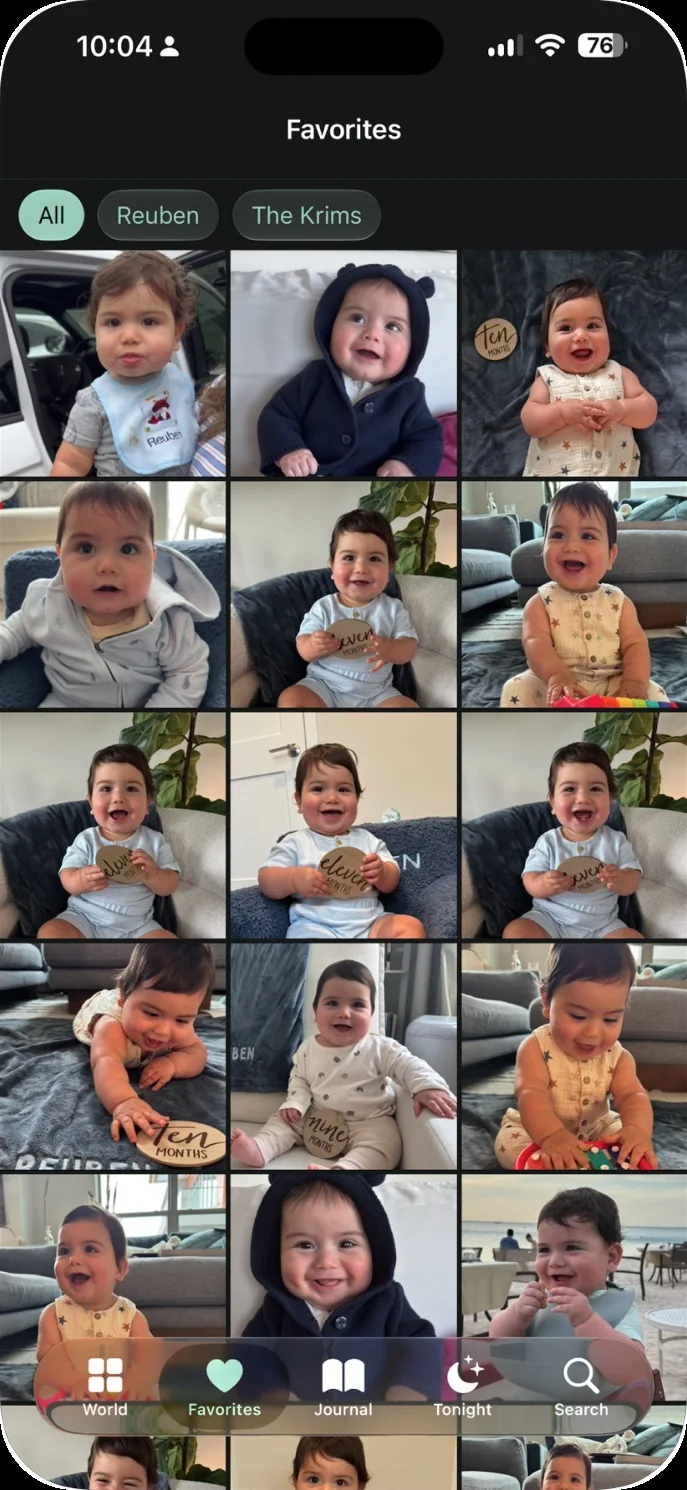
The app we make: Our Little World is a private baby book app for iPhone and iPad. It finds your child in the photos on your iPhone and lays them out month by month. Invite the other parent, and once you each say yes, your photos of the children join theirs and theirs join yours, with no shared albums to keep up. Grandparents and family members you invite can view what's shared with them, never face data. You can read more on our page for both parents. Our Little World isn't the right choice if either parent or a grandparent uses Android, if you want a printed book, or if you need a free plan.